Computer monitor
Output device displaying computer information in pictorial or textual form.

A computer monitor is an output device that displays information in pictorial or textual form.
- field
- Output device technology
- known_for
- Displaying information from a computer in pictorial or textual form
- first_technology
- Cathode ray tube (CRT)
- dominant_technology_by_2000s
- LCD with LED backlight
- common_connectors
- DisplayPort, HDMI, USB-C, DVI, VGA
Lore & Background
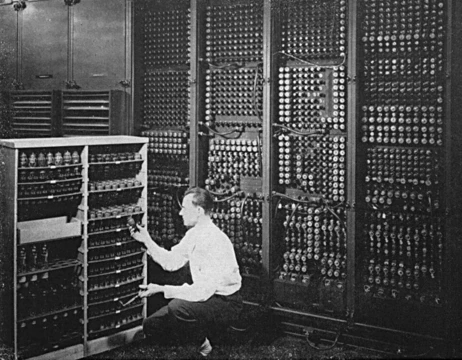
Early electronic computer front panels were fitted with an array of light bulbs where the state of each bulb indicated the on/off state of a particular register bit, allowing engineers to monitor the internal state of the machine; this panel of lights came to be known as the 'monitor'. As early monitors were only capable of displaying a very limited amount of information and were very transient, they were rarely considered for program output; instead, a line printer was the primary output device. Computer monitors were formerly known as visual display units (VDU), particularly in British English, a term that mostly fell out of use by the 1990s. The first computer monitors used cathode ray tubes (CRTs). Prior to the advent of home computers in the late 1970s, it was common for a video display terminal (VDT) using a CRT to be physically integrated with a keyboard and other components in a single large chassis, typically limiting them to emulation of a paper teletypewriter, thus the early epithet of 'glass TTY'. The display was monochromatic and far less sharp and detailed than on a modern monitor. By the end of the 1980s color progressive scan CRT monitors were widely available and increasingly affordable. During the following decade, maximum display resolutions gradually increased and prices continued to fall as CRT technology remained dominant in the PC monitor market into the new millennium, partly because it remained cheaper to produce.
Reader's Guide
The computer monitor evolved from a simple array of light bulbs on early computer front panels—used only to monitor internal machine state—into a sophisticated output device capable of displaying both data and video. Its development reflects the broader shift in computing from specialized data processing to multimedia use. The transition from CRT to LCD technology, completed by the mid-2000s, brought lighter, smaller, and more power-efficient displays, though CRTs retained advantages in black levels, viewing angles, and response time. Modern monitors are often functionally interchangeable with television sets, though most lack integrated speakers, TV tuners, or remote controls, requiring external components such as a DTA box for TV use. The monitor's significance lies in its role as the primary visual interface between humans and computers, enabling everything from text-based data processing to high-definition video and graphics. Its performance is measured by parameters such as viewable image size, aspect ratio, display resolution, and dot pitch, which continue to improve with advances in LCD, OLED, and HDR technologies.
Did You Know?
- The term 'monitor' originated from the array of light bulbs on early computer front panels that allowed engineers to monitor the internal state of the machine.
- Computer monitors were formerly known as visual display units (VDU), particularly in British English, a term that mostly fell out of use by the 1990s.
Frequently Asked Questions
What is a computer monitor?
A computer monitor is an output device whose job is to render information from a computer in either pictorial or textual form. It acts as the primary visual interface between the user and the machine.
What was the first display technology used in computer monitors?
The earliest monitors relied on cathode ray tube (CRT) technology to produce images. This bulky glass-tube approach dominated the field well before flat-panel alternatives arrived.
What technology became the standard for monitors by the 2000s?
By the 2000s, LCD panels with LED backlighting had largely supplanted CRTs as the go-to monitor technology. This shift made displays noticeably thinner, lighter, and more energy-efficient.
What connectors are commonly found on modern computer monitors?
Typical modern monitors carry ports such as DisplayPort, HDMI, USB-C, DVI, and VGA. These connectors link the display to a computer or other video source for signal transmission.
More in Computing & Digital 1-24
Spotted an error? Know more?
This is a living reference — every entry is fact-audited, and reader corrections feed straight into our audit queue. Suggest an edit · See this site's audit record